Waterline Transactions in Sails.js: History, API, and Real-World Usage

Kelvin Omereshone
@Dominus_Kelvin
Every so often, a Sails developer discovers a part of the framework they had not used before, and I am always pleased when that discovery turns into a “wait, Sails can do that?” moment.
Those moments are good for the ecosystem. They remind me why it is worth continuing to preach, document, and educate the wider web development world about Sails: to help JavaScript developers who are tired of chasing shiny things build calmer web systems in JavaScript.
Sails has practical depth beyond the common CRUD workflow. You can build a small app with it, but when the app needs application-level consistency guarantees, there are capabilities many teams overlook.
This guide covers the history, a short database transaction refresher, the modern Waterline API, real-world Sails examples, and the operational caveats you should know before putting transactions in production code.
What is a Waterline transaction?
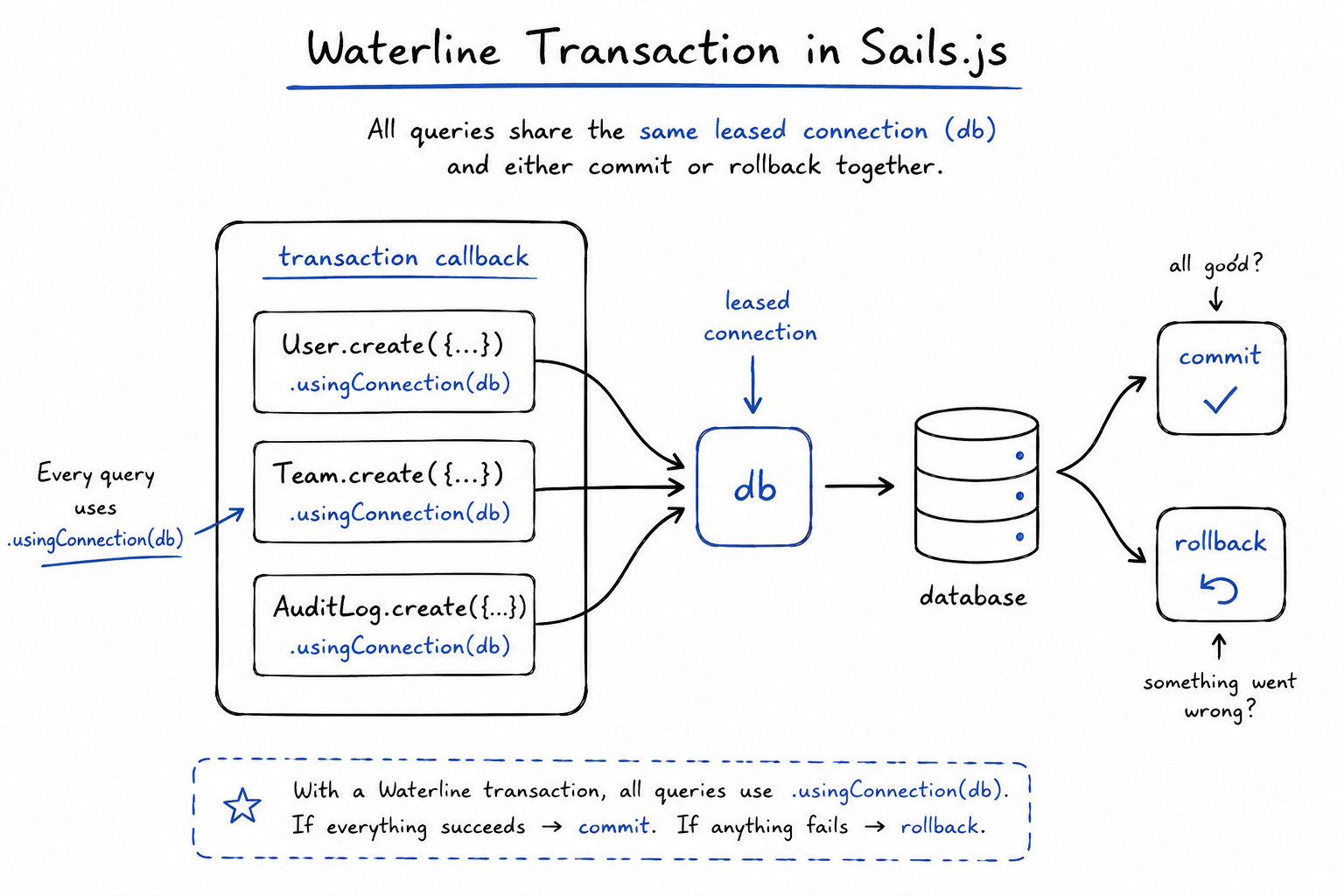
A Waterline transaction lets you group multiple database operations so they succeed or fail as one unit.
In Sails, the public API looks like this:
await sails.getDatastore().transaction(async (db) => {
  await User.create({
    email: 'ada@example.com'
  }).usingConnection(db);

  await AuditLog.create({
    message: 'Created Ada'
  }).usingConnection(db);
});
If both queries succeed, Waterline asks the adapter to commit the transaction. If any query throws, Waterline asks the adapter to roll it back.
The db argument is the connection Waterline temporarily leases from the datastore for this transaction. Waterline keeps that one connection for the callback, then releases it after commit or rollback. Every query that should participate in the transaction must use:
.usingConnection(db)Without .usingConnection(db), that query does not run on the transaction connection. It can run outside the transaction and commit independently, which breaks atomicity.
Why transactions matter
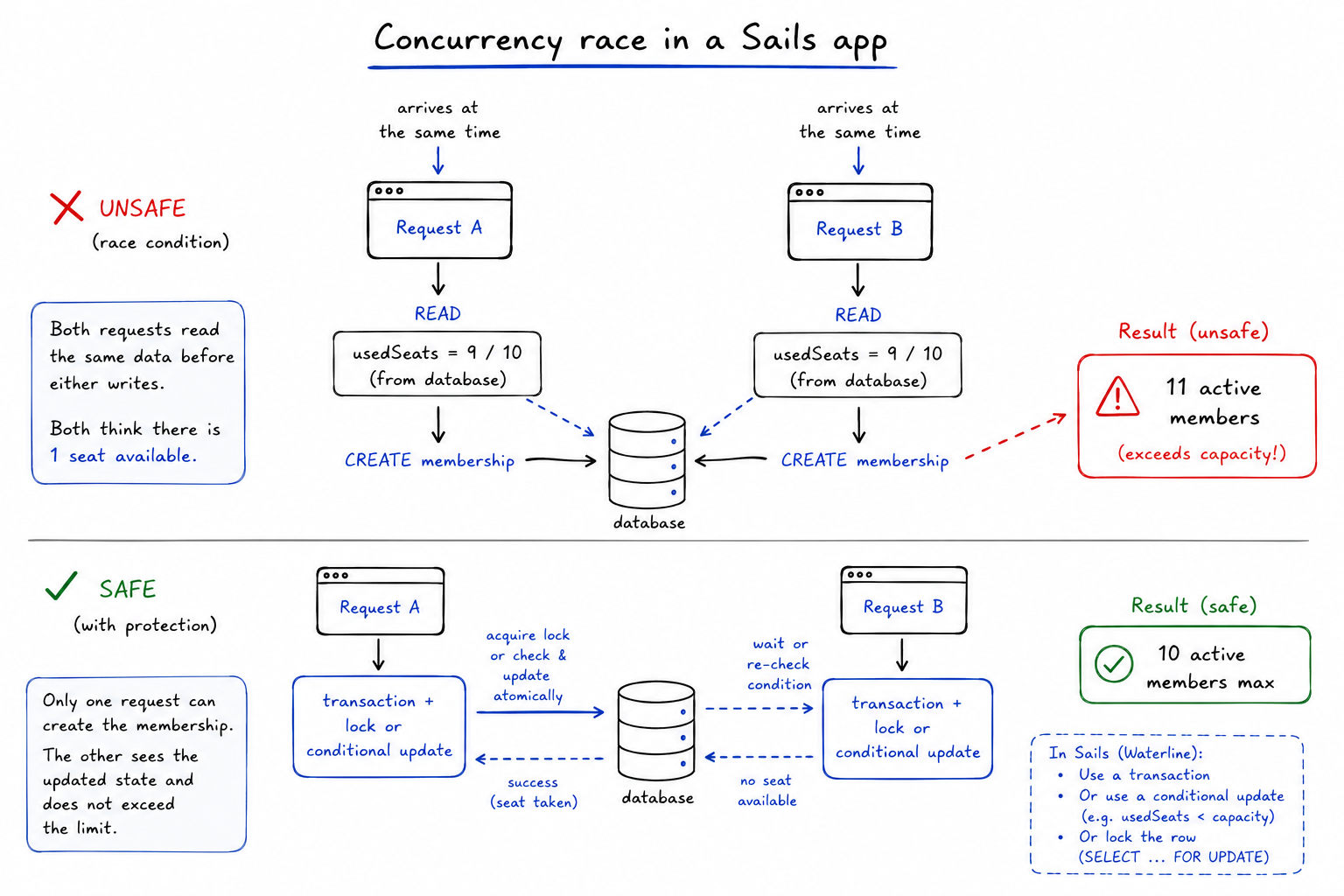
Most bugs that require transactions do not start as obvious failures. Mike McNeil’s first public .transaction() GitHub issue framed the deeper premise well: the code can look correct when one request runs, then break when two requests observe the same state before either write completes.
In a Sails app, that category shows up in places like:
- Team slug reservation: two onboarding requests both see
atlas-labsas available, then both try to create the team, membership, and audit log. A unique index should still enforce the slug, but the surrounding writes need one atomic unit. - Seat-limited membership: two admins accept the last available seat at the same time. Both read
usedSeats = 9on a 10-seat plan, and without a lock or conditional update, the account can end up with 11 active members. - Wallets and usage credits: two background jobs spend the same promotional credit balance. Each job reads the old balance, calculates a valid-looking deduction, and writes back a result that silently loses one deduction.
- Media upload quotas: two large uploads pass the quota check before either file is marked as pending. The database transaction should reserve the bytes first; the object-storage upload, cleanup, and retry path happen outside the database transaction.
A transaction says: either the whole unit of work is valid, or none of it is allowed to persist.
A brief history of Waterline transactions
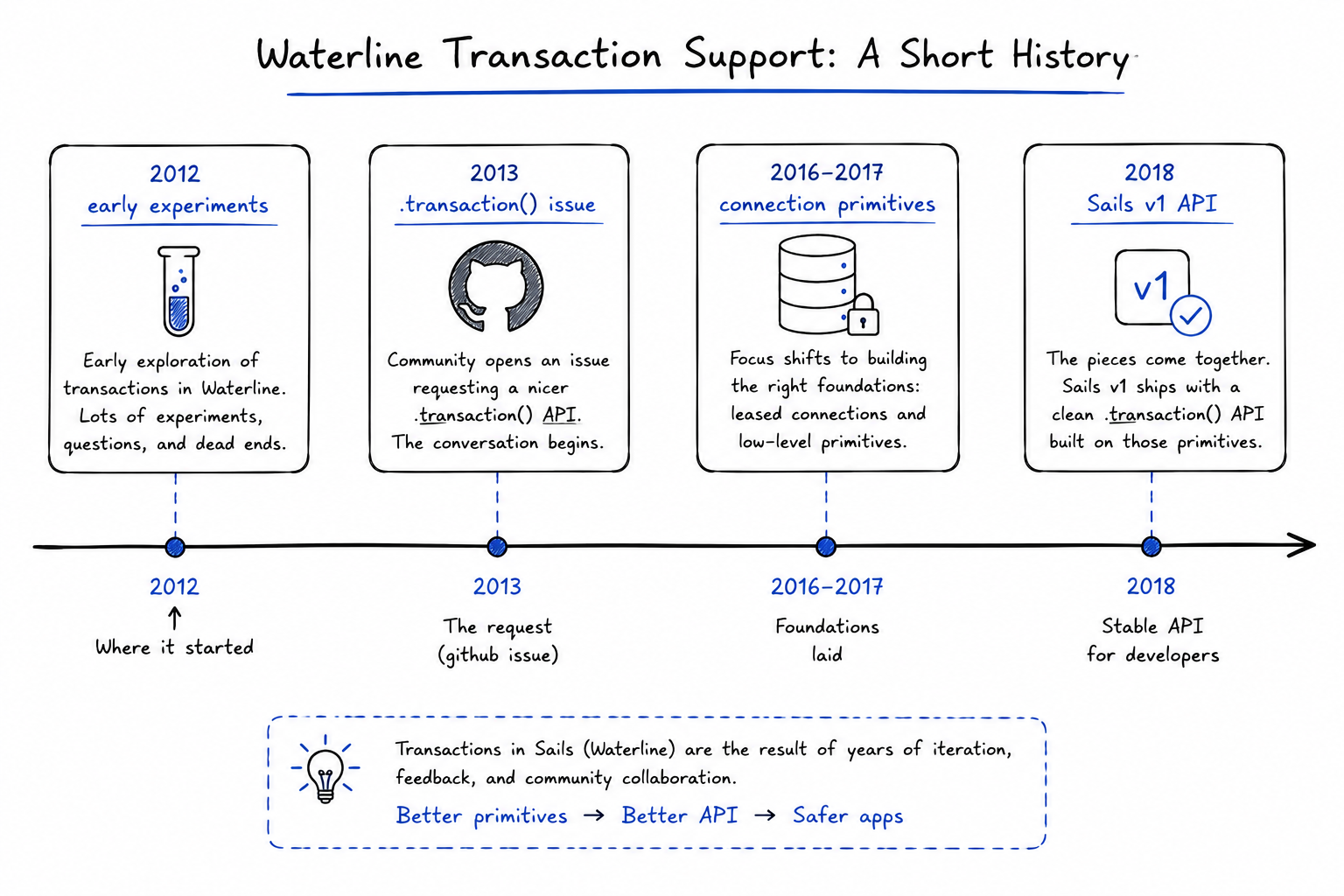
The public trail starts in late 2012, when the older Sails repo already contained transaction experiments, early tests, and collection-level transaction work.
The shape was different from today’s API, but the problem was already clear: developers needed a way to make multiple model operations atomic.
In July 2013, Mike McNeil opened a public GitHub issue titled .transaction().
The proposed API looked different from what we use today. It explored ideas like User.transaction().find(...), explicit rollback(cb), explicit commit(cb), automatic use in findOrCreate(), and even the harder question of cross-adapter transactions.
Community reports later clarified the production problem. In December 2014, a feature request for transactions was opened, now visible after the Waterline issue migration.
The comments show the practical issue: developers were trying to use raw Model.query() calls for PostgreSQL and MySQL transactions, then discovering that different queries could run on different pooled connections.
Once that happens, BEGIN, COMMIT, and ROLLBACK are no longer wrapping the same unit of work.
The core design requirement was connection affinity: transactions are more than “send BEGIN before some SQL.” You must keep every operation on one connection until the unit of work is done.
Waterline’s roadmap later listed transactions as “the ability to run transactions on adapters that support them.”
Around the same period, Waterline added plumbing like .meta() pass-through, which mattered because Waterline needed a reliable way to pass extra information down to adapters.
By Sails v1, the modern datastore transaction API was in place.
The Sails v1 upgrade guide notes that Waterline v0.13 introduced full support for SQL transactions, dynamic database connections, projections, and more granular query control.
Sails 1.0.0 was published on npm on March 28, 2018, and that is the point where most Sails users would have met the modern datastore transaction API.
The current official transaction docs expose the API as datastore.transaction().
The .usingConnection() docs explain how to attach individual queries to the leased connection.
The resulting design was:
- Transactions live at the datastore level.
- Waterline leases one connection.
- The adapter begins the transaction.
- Your callback runs.
- Every participating query uses
.usingConnection(db). - Waterline commits or rolls back.
- The connection is released.
Timeline: how Waterline transactions took shape
Here is the condensed public timeline from GitHub issues, Sails and Waterline history, adapter-related repositories, and npm publish metadata.
- December 11, 2012: the older Sails repo already had transaction work on the radar when it added todo stubs for lock/unlock transaction support code.
- December 23, 2012: Sails added an early transaction and lock test scaffold, followed by a first batch of transaction support tests.
- December 26, 2012: Waterline
0.0.5was published on npm, and the Sails repo had commits like the Waterline0.0.5transaction support bump and transaction support for dirtyDB. This was the old experimental line, not today’s final API. - December 29, 2012: Waterline
0.0.51was published on npm, and Sails upgraded to catch working transaction support. That same date also had experimentation, test failures, and reversions around transaction collections, so the first shape was not the final one. - January 2, 2013: Sails made
createEach()andfindOrCreateEach()transactional in that early system. - March 6, 2013: Sails disabled transactions by default for compound queries and removed transactions from default
createEach(). The project tried broad automatic transactions early, then pulled back from parts of it. - July 13, 2013: Mike McNeil opened a public
.transaction()issue, laying out the design problem: same-adapter transactions, commit/rollback behavior, aggregate and composite queries, increment/decrement, retry attempts, and cross-adapter questions. - December 8, 2014: the community feature request for transactions was opened. The comments show developers trying raw
Model.query()workarounds and running into the connection-pool problem. - April 17, 2015: maintainers noted in that thread that transactions were not slated for
0.11and were not trivial. - April 22, 2015: the discussion clarified the key implementation lesson: you need one connection and you must keep every operation on that connection.
- April 29, 2015: the thread mentioned looking at
sails-mysql-transactionsand Knex and floated the idea of a future adapter API, possibly calledTransactable. - June 4, 2015: the same feature thread pointed back to the older
.transaction()spec, including same-adapter transactions using the database’s built-in transaction support. - January 16, 2016: Waterline added transactions to the roadmap.
- November 2, 2016: Waterline added
.usingConnection()support to deferred query objects and validated the connection while building operations. - December 31, 2016: Waterline
0.13.0-2was published on npm, beginning the prerelease line that would become the Sails v1-era ORM. - January 24 and February 7, 2017: Waterline fixed important
.meta()and.usingConnection()interaction bugs with one commit preventing.meta()from squashing.usingConnection()and another commit fixing both modifiers together. - January 26, 2017:
sails-hook-ormmade.transaction()work with the then-current edgesails-postgresql. - February 12, 2017:
sails-hook-ormmade native datastore queries support.usingConnection(), which matters when you need native SQL inside a transaction. - February 16, 2017: Waterline
0.13.0-rc1was published on npm. - August 9, 2017:
sails-hook-ormexposedsails.sendNativeQuery()andsails.transaction()as convenience APIs. - February 8, 2018: Waterline
0.13.1was published on npm. There was no plain0.13.0stable on npm, so the stable0.13line effectively arrived through0.13.1and later. - March 28, 2018: Waterline
0.13.2, Waterline0.13.3, and Sails1.0.0were published. This is the practical release-date anchor for modern Sails transaction support. - May 28, 2018:
sails-hook-ormimplemented improved sniffing for.transaction()and.leaseConnection(). - November 13, 2018: Sails
1.1.0was published on npm. Its changelog calls out cleaner usage for.stream(),.transaction(), and.leaseConnection(), where async functions no longer need the callback argument if it is omitted from the function signature. - January 4, 2019: a Sails issue reported a PostgreSQL transaction connection problem in Sails
1.1.0withsails-postgresql1.0.1, showing that adapter and connection edge cases still mattered after the API shipped. - February 20, 2019:
sails-hook-ormadded TODOs about better sniffing for transaction and lease-connection procedural parameters, referencing that issue. - January 20, 2021: the Sails repo updated the transaction documentation, continuing the public documentation trail.
- September 16-17, 2025: in
sails-disk, I worked on transaction tests and a transaction-support experiment, then removed thetransactionalfeature marker once the adapter limits were clear. That work became useful background for thinking about development adapters and the limits of simulating transactions without native database support.
In short, the Sails ecosystem started experimenting with transaction semantics in late 2012, publicly debated the API through 2013-2015, and built the modern connection-based primitives during the Sails v1 / Waterline 0.13 work in 2016-2017.
The feature became broadly available to Sails users with the Sails 1.0.0 release on March 28, 2018.
What database transactions are
The PostgreSQL docs describe transactions as a way to bundle multiple steps into one all-or-nothing operation.
If a failure prevents the transaction from completing, none of the steps affect the database.
The standard terminology here is ACID:
- Atomicity: all operations happen, or none happen.
- Consistency: the database moves from one valid state to another valid state.
- Isolation: concurrent transactions should not see each other’s incomplete work.
- Durability: once committed, the work should survive a crash.
You can read the PostgreSQL guide on transactions for a database-native explanation.
For the concurrency side, the PostgreSQL page on transaction isolation covers dirty reads, nonrepeatable reads, phantom reads, serialization anomalies, and isolation levels.
If you want a Sails-specific companion, I also wrote about the adapter side in How I Implemented Transactions in sails-disk.
That post looks at the harder case of simulating transaction-like behavior in a file-backed development adapter.
The Waterline transaction API
The primary API is:
await sails.getDatastore().transaction(async (db) => {
  // Queries that should be part of the transaction go here.
});
You can also start from a model’s datastore:
await User.getDatastore().transaction(async (db) => {
  const updatedUser = await User.updateOne({ id: userId })
    .set({
      lastSeenAt: Date.now()
    })
    .fetch()
    .usingConnection(db);

  await UserLogin.create({
    user: updatedUser.id,
    ipAddress
  }).usingConnection(db);
});
That form is useful when the transaction is centered on a model and you want to use whatever datastore that model is configured to use.
This matters most in apps with named datastores or models split across multiple databases. It does not make a single query safer by itself; every query in the unit of work still needs to be on the same datastore and use .usingConnection(db).
When you know the datastore name, you can start the transaction from that datastore directly. This is useful when the unit of work belongs to a specific database, such as billing data that lives outside your default datastore:
await sails.getDatastore('billing').transaction(async (db) => {
  const invoice = await Invoice.create({
    customer: customerId,
    status: 'draft'
  })
    .fetch()
    .usingConnection(db);

  await InvoiceLineItem.createEach(
    lineItems.map((lineItem) => ({
      invoice: invoice.id,
      description: lineItem.description,
      amount: lineItem.amount
    }))
  ).usingConnection(db);
});
Only do this when every participating model in the unit of work uses the billing datastore. A transaction cannot make writes across default, billing, and an external API commit as one database operation.
The callback can return a value:
const newTeam = await sails.getDatastore().transaction(async (db) => {
  return await Team.create({
    name: 'Core Team'
  })
    .fetch()
    .usingConnection(db);
});
If the callback returns successfully, the transaction commits and the returned value becomes the result of transaction(). If the callback throws, the transaction rolls back and the error bubbles up.
The modern async style does not require a proceed callback as long as your function only declares the db argument:
await sails.getDatastore().transaction(async (db) => {
  // No proceed callback needed here.
});
Older Sails examples may show:
await sails.getDatastore().transaction(function (db, proceed) {
  // older callback style
});
That existed, but for modern Sails code, prefer the async function style.
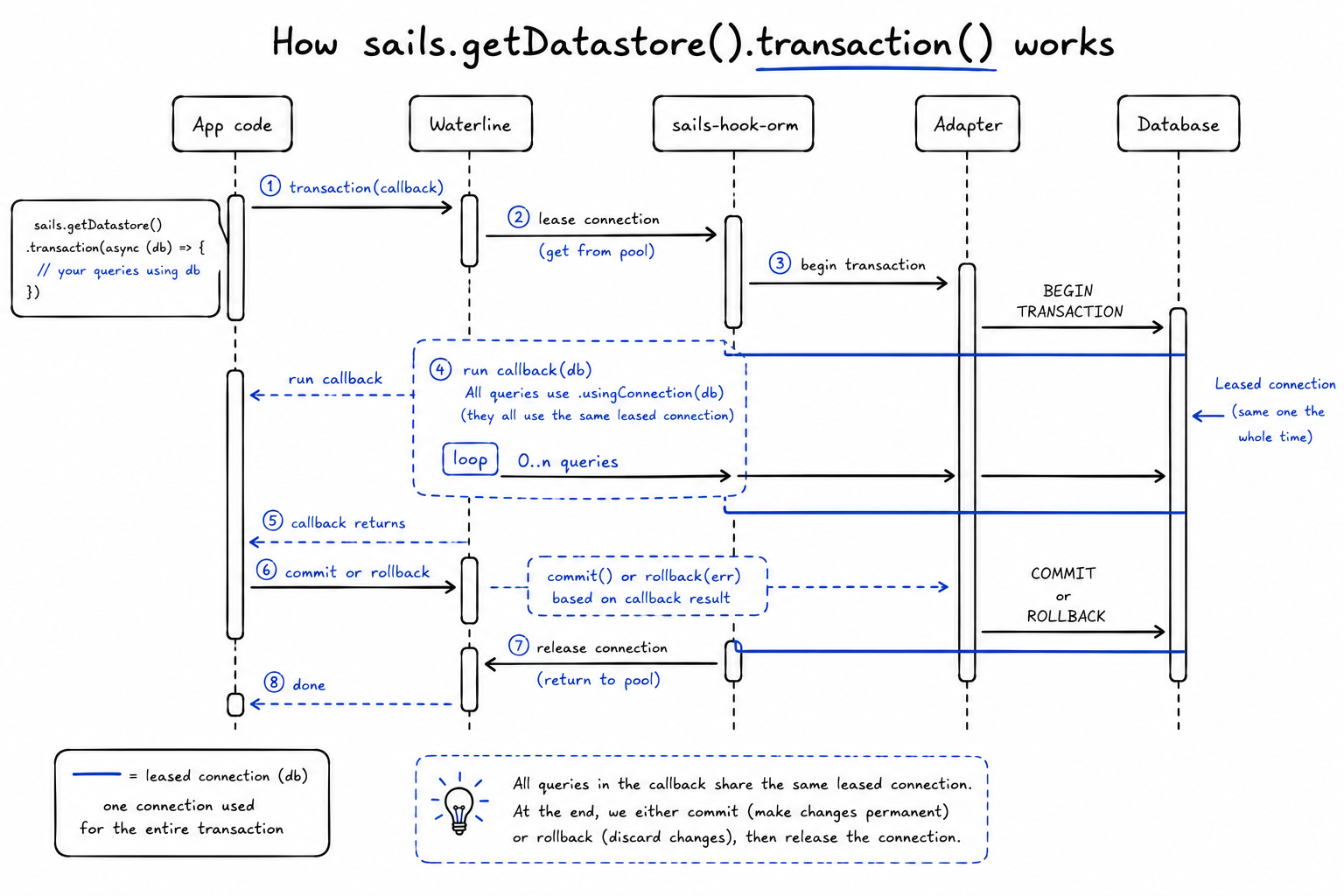
What happens under the hood
The implementation lives in the Sails ORM layer, especially sails-hook-orm.
Conceptually, the flow is:
- Check that the datastore’s adapter supports the transactional interface.
- Lease a connection from the datastore.
- Ask the adapter to begin a transaction on that connection.
- Run your
duringfunction with the leased connection asdb. - If your function throws, ask the adapter to roll back.
- If your function completes, ask the adapter to commit.
- Release the connection back to the pool.
The pieces line up like this:
waterlineprovides the query modifier.usingConnection(), which stores the leased connection in query metadata.sails-hook-ormexposes registered datastore methods like.transaction()and.leaseConnection().sails-hook-orm’s transaction helper handles begin, commit, rollback, and release.- SQL driver packages such as
machinepack-postgresqlandmachinepack-mysqlimplement the nativeBEGIN,COMMIT, andROLLBACKcommands. - Adapter packages decide whether they expose the required transaction methods to Waterline.
Waterline can orchestrate a transaction only when the adapter supports the necessary transactional interface.
Real-world example: user signup with a team
A signup flow often creates multiple records:
- a
User - a
Team - a
Membership - maybe an audit log or onboarding state
If the membership creation fails after the user and team are created, your app is left with orphaned records and inconsistent state. A transaction keeps the signup unit atomic.
// api/helpers/users/signup-with-team.js
module.exports = {
  friendlyName: 'Signup with team',

  inputs: {
    email: { type: 'string', required: true },
    password: { type: 'string', required: true },
    fullName: { type: 'string', required: true },
    ipAddress: { type: 'string' }
  },

  fn: async function ({ email, password, fullName, ipAddress }) {
    return await sails.getDatastore().transaction(async (db) => {
      const newUser = await User.create({
        email,
        password,
        fullName,
        tosAcceptedByIp: ipAddress
      })
        .fetch()
        .usingConnection(db);

      const newTeam = await Team.create({
        name: `${fullName}'s Team`
      })
        .fetch()
        .usingConnection(db);

      await Membership.create({
        member: newUser.id,
        team: newTeam.id,
        role: 'owner',
        status: 'active'
      }).usingConnection(db);

      await AuditLog.create({
        actor: newUser.id,
        action: 'team.created',
        team: newTeam.id
      }).usingConnection(db);

      return {
        user: newUser,
        team: newTeam
      };
    });
  }
};
Every record in this example belongs to the same unit of work. Either the signup completes, or the database behaves as if it never happened.
Real-world example: order checkout
Checkout often spans several writes:
- create the order
- create order line items
- decrement inventory
- create a payment attempt
You do not want an order without items. You do not want inventory reduced without an order. You do not want a payment attempt attached to a missing order.
await sails.getDatastore().transaction(async (db) => {
  const order = await Order.create({
    customer: customerId,
    status: 'pending',
    total: cart.total
  })
    .fetch()
    .usingConnection(db);

  for (const item of cart.items) {
    await OrderItem.create({
      order: order.id,
      product: item.productId,
      quantity: item.quantity,
      unitPrice: item.unitPrice
    }).usingConnection(db);

    const product = await Product.findOne({ id: item.productId })
      .usingConnection(db);

    if (!product) {
      throw Object.assign(new Error('Product not found.'), {
        code: 'E_PRODUCT_NOT_FOUND'
      });
    }

    if (product.quantityAvailable < item.quantity) {
      throw Object.assign(new Error('Not enough inventory.'), {
        code: 'E_OUT_OF_STOCK'
      });
    }

    await Product.updateOne({ id: item.productId })
      .set({
        quantityAvailable: product.quantityAvailable - item.quantity
      })
      .usingConnection(db);
  }

  await PaymentAttempt.create({
    order: order.id,
    provider: 'stripe',
    status: 'requires_confirmation'
  }).usingConnection(db);

  return order;
});
This improves atomicity, but there is still an important concurrency warning here: the findOne() then updateOne() inventory pattern can race under high traffic.
Two checkouts can read the same stock value before either update lands.
For inventory, wallet transfers, counters, and balances, a transaction is necessary but often not sufficient. You may also need database constraints, conditional updates, or row-level locking.
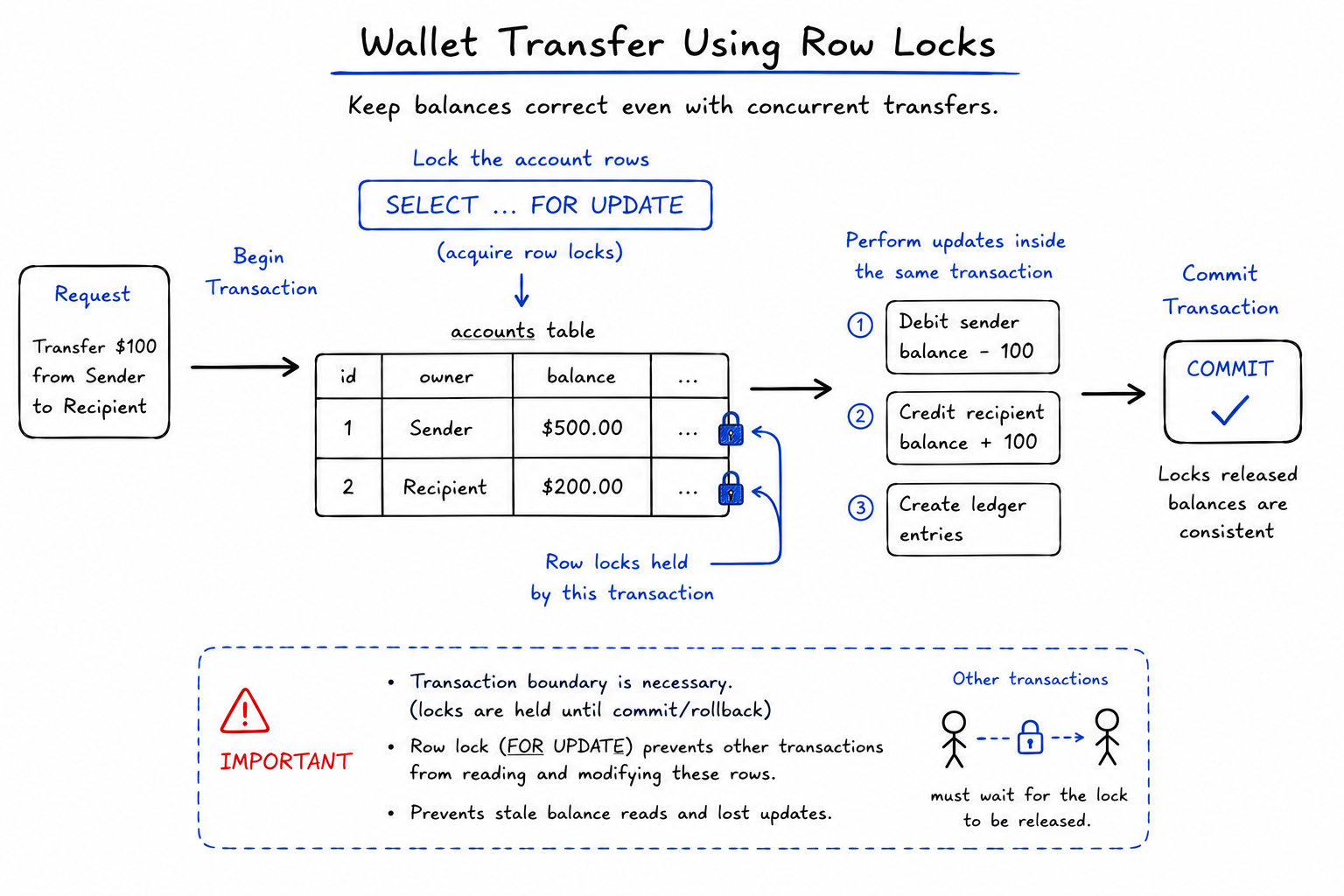
Real-world example: wallet transfer with row locks
The official Sails transaction docs use a bank transfer example, and they correctly warn that real increment/decrement logic should include row-level locking.
Waterline gives you the transaction boundary. When you need row locks, use native SQL inside that same transaction connection.
Here is a PostgreSQL-flavored example:
await sails.getDatastore()
  .transaction(async (db) => {
    const locked = await sails.getDatastore()
      .sendNativeQuery(
        `
        SELECT id, balance
        FROM bank_account
        WHERE id = $1 OR id = $2
        FOR UPDATE
        `,
        [senderAccountId, recipientAccountId]
      )
      .usingConnection(db);

    let sender;
    let recipient;

    for (const row of locked.rows) {
      if (row.id === senderAccountId) {
        sender = row;
      }

      if (row.id === recipientAccountId) {
        recipient = row;
      }
    }

    if (!sender || !recipient) {
      throw Object.assign(new Error('Account not found.'), {
        code: 'E_ACCOUNT_NOT_FOUND'
      });
    }

    if (sender.balance < amount) {
      throw Object.assign(new Error('Insufficient funds.'), {
        code: 'E_INSUFFICIENT_FUNDS'
      });
    }

    await BankAccount.updateOne({ id: senderAccountId })
      .set({ balance: sender.balance - amount })
      .usingConnection(db);

    await BankAccount.updateOne({ id: recipientAccountId })
      .set({ balance: recipient.balance + amount })
      .usingConnection(db);

    await LedgerEntry.createEach([
      {
        account: senderAccountId,
        direction: 'debit',
        amount,
        description: 'Transfer sent'
      },
      {
        account: recipientAccountId,
        direction: 'credit',
        amount,
        description: 'Transfer received'
      }
    ]).usingConnection(db);
  })
  .intercept('E_ACCOUNT_NOT_FOUND', 'notFound')
  .intercept('E_INSUFFICIENT_FUNDS', 'badRequest');
Two details matter here:
- The
SELECT ... FOR UPDATEquery uses.usingConnection(db), so the lock belongs to this transaction. - The table and column names in native SQL are physical database names. Adjust them for your own adapter,
tableName,columnName, and database conventions.
Use Sails’ low-level datastore access for database-specific locking while keeping the rest of the workflow in Waterline on the same transaction connection.
Real-world example: deleting parent and child records
Another practical use case is deleting a parent record and its dependent records.
await sails.getDatastore().transaction(async (db) => {
  const project = await Project.findOne({
    id: projectId,
    owner: this.req.me.id
  }).usingConnection(db);

  if (!project) {
    throw Object.assign(new Error('Project not found.'), {
      code: 'E_PROJECT_NOT_FOUND'
    });
  }

  await Task.destroy({ project: project.id })
    .usingConnection(db);

  await ProjectMember.destroy({ project: project.id })
    .usingConnection(db);

  await Project.destroyOne({ id: project.id })
    .usingConnection(db);
})
  .intercept('E_PROJECT_NOT_FOUND', 'notFound');
Without a transaction, a failure halfway through can leave some child records deleted and the parent still present. With a transaction, the deletion is one coherent unit.
Error handling inside transactions
Throw to roll back.
await sails.getDatastore()
  .transaction(async (db) => {
    const user = await User.create({
      email: inputs.email
    })
      .fetch()
      .usingConnection(db);

    if (!user.email.endsWith('@example.com')) {
      throw Object.assign(new Error('Only example.com emails are allowed.'), {
        code: 'E_INVALID_EMAIL_DOMAIN'
      });
    }

    return user;
  })
  .intercept('E_INVALID_EMAIL_DOMAIN', 'badRequest');
If the error is thrown after the User.create(), the create is rolled back.
You can also catch low-level errors and rethrow app-friendly ones:
await sails.getDatastore()
  .transaction(async (db) => {
    try {
      return await User.create({
        email: inputs.email
      })
        .fetch()
        .usingConnection(db);
    } catch (err) {
      if (err.code === 'E_UNIQUE') {
        throw Object.assign(new Error('Email already exists.'), {
          code: 'E_EMAIL_ALREADY_IN_USE'
        });
      }

      throw err;
    }
  })
  .intercept('E_EMAIL_ALREADY_IN_USE', 'badRequest');
Do not swallow errors inside the transaction callback unless you intentionally want the transaction to continue and commit.
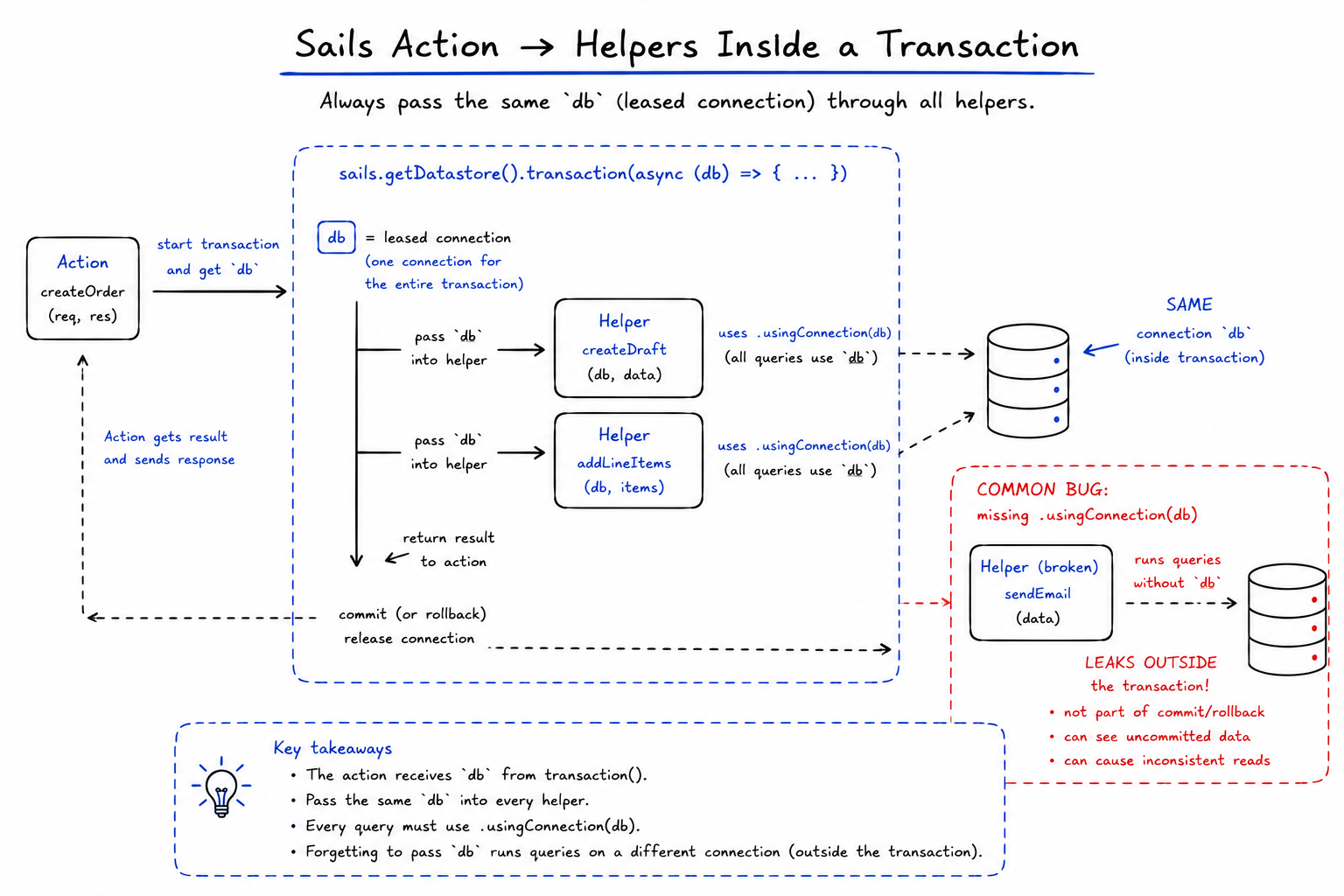
Passing the transaction connection through your own helpers
As transaction logic grows, you will often call your own helpers from inside the transaction. Pass the db connection along explicitly.
await sails.getDatastore().transaction(async (db) => {
  const invoice = await sails.helpers.invoices.createDraft.with({
    customer: customerId,
    db
  });

  await sails.helpers.invoices.addLineItems.with({
    invoice: invoice.id,
    items,
    db
  });
});
Then the helper should use it:
// api/helpers/invoices/create-draft.js
module.exports = {
  inputs: {
    customer: { type: 'number', required: true },
    db: { type: 'ref', required: true }
  },

  fn: async function ({ customer, db }) {
    return await Invoice.create({
      customer,
      status: 'draft'
    })
      .fetch()
      .usingConnection(db);
  }
};
A common transaction bug is a top-level action that uses .transaction() while a helper called inside it performs a query without .usingConnection(db).
That helper’s query is now outside the transaction.
transaction() vs leaseConnection()
Sails also exposes leaseConnection(). It gives you one connection for multiple queries, but it does not automatically begin a transaction.
Use .leaseConnection() when you need connection affinity but not commit/rollback semantics. Use .transaction() when you need atomicity.
await sails.getDatastore().leaseConnection(async (db) => {
  const rows = await sails.getDatastore()
    .sendNativeQuery('SELECT NOW();')
    .usingConnection(db);

  return rows;
});
With .transaction(), Sails does more:
await sails.getDatastore().transaction(async (db) => {
  // begin transaction already happened
  // commit or rollback will happen automatically
});
Adapter support
The Sails docs currently describe .transaction() in the context of SQL adapters such as sails-mysql and sails-postgresql.
The boundary is the adapter. Waterline exposes the API, while the published SQL adapter packages that Sails apps install provide the database-specific transaction operations through their adapter or driver layer:
sails-postgresqldepends onmachinepack-postgresql, whose transaction machines includebegin,commit, androllback.sails-mysqldepends onmachinepack-mysql, whose transaction machines includebegin,commit, androllback.sails-sqliteis also a published Sails/Waterline adapter, and its adapter machines includebegin-transaction,commit-transaction, androllback-transaction.
But do not assume every adapter supports transactions just because Waterline has the API. The adapter has to implement the required transactional methods, and the underlying database has to provide transaction semantics.
If it does not, Sails will reject .transaction() for that datastore with a not-supported style error.
This is especially important if you switch adapters between development and production. A common pattern is to use a lightweight adapter locally and PostgreSQL or MySQL in production.
If your application code depends on transactions, make sure the development adapter supports the same behavior or run development against the same database family you use in production.
What transactions do not solve
Transactions provide atomicity, but they are not a complete consistency strategy.
They do not replace database constraints
Use unique indexes for uniqueness. Use foreign keys when your adapter and schema strategy support them. Use database constraints for rules that must survive bugs in application code.
A transaction can roll back a failed signup, but a unique index is still the thing that prevents two concurrent signups from claiming the same email.
They do not automatically lock rows you read
If your logic is “read a value, calculate a new value, write it back,” you need to think about concurrency.
This is risky:
const account = await BankAccount.findOne({ id }).usingConnection(db);

await BankAccount.updateOne({ id })
  .set({ balance: account.balance - amount })
  .usingConnection(db);
Under concurrency, two transactions can read the same starting balance. Use database-specific locking, conditional updates, or a stronger isolation strategy where appropriate.
They do not make cross-datastore work atomic
A Waterline transaction belongs to one datastore connection.
If your unit of work touches PostgreSQL, Redis, and a third-party payment API, Waterline cannot make all of those systems commit and roll back as one database transaction.
For cross-system workflows, use patterns like:
- idempotency keys
- outbox tables
- compensating actions
- background jobs
- reconciliation tasks
Keep the database transaction focused on the database state it can control.
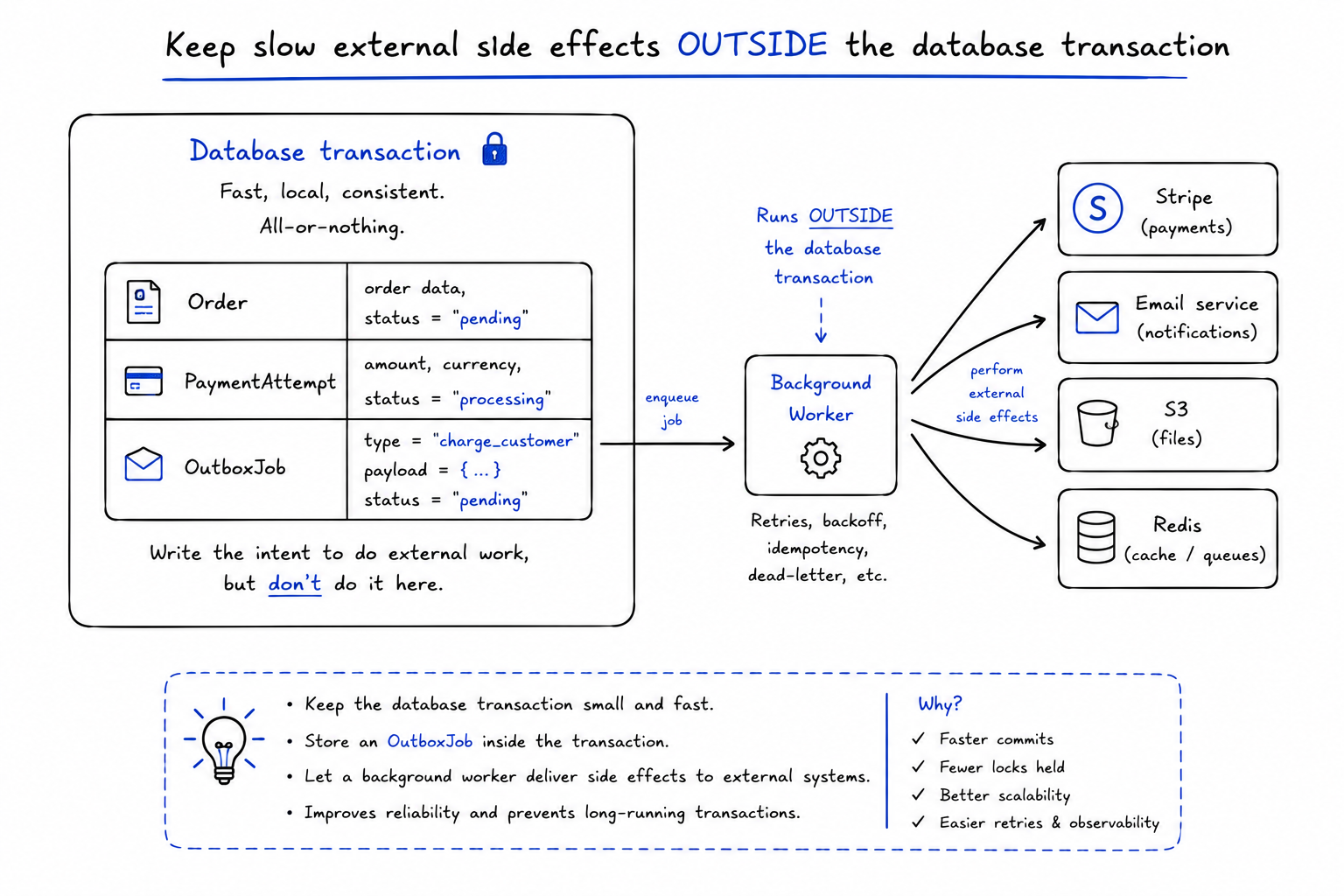
They should not contain slow external work
Do not hold a database transaction open while you call Stripe, send email, upload files, or make slow HTTP requests.
A better pattern is:
- Use a transaction to write the local state and enqueue an outbox/job record.
- Commit.
- Let a worker perform the external side effect.
- Update local state in another small transaction if needed.
Short transactions reduce lock time, contention, and pool pressure.
A practical checklist
When writing a Waterline transaction, check these:
- Am I using the correct datastore?
- Do all participating models use that same datastore?
- Does every query inside the callback use
.usingConnection(db)? - Do helper functions receive and use the same
dbconnection? - Am I throwing errors when I want rollback?
- Am I relying on database constraints for uniqueness and integrity?
- Do I need row-level locks or conditional updates for read-modify-write logic?
- Am I keeping external API calls outside the transaction?
- Does my development adapter support the same transaction behavior as production?
Final thoughts
Waterline transactions are a practical part of Sails’ data layer. They help keep multi-step writes consistent as your product grows.
The API is small:
await sails.getDatastore().transaction(async (db) => {
  await Something.create({ ... }).usingConnection(db);
});
But the mental model is important:
- the transaction belongs to a datastore connection
- every participating query must use that connection
- thrown errors roll back
- successful completion commits
- database-specific concurrency still deserves database-specific thinking
So yes, Sails can do that.
And I am always glad when more developers discover it.